

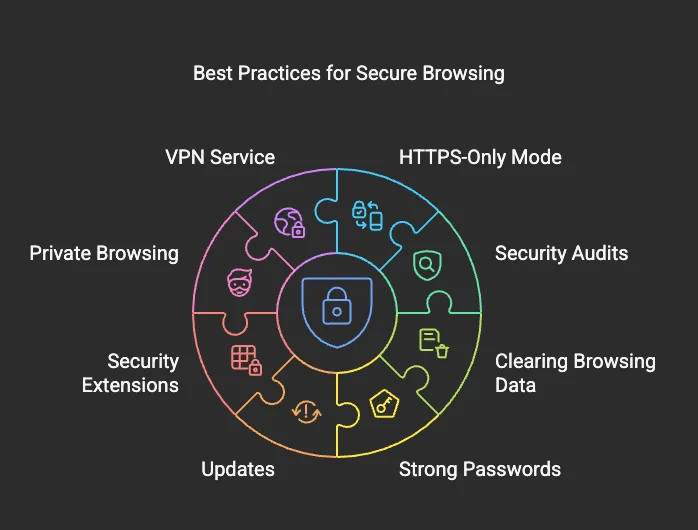
Browsing the internet has become an everyday activity, supporting communication, learning, shopping, and entertainment. While the web offers vast opportunities and convenience, it also exposes users to risks such as malicious websites, deceptive content, and unsafe digital practices. Safe browsing is not about fear or restriction, but about awareness, informed choices, and responsible navigation.
Many online threats rely on users acting quickly, trusting unfamiliar sources, or overlooking basic warning signs. By understanding how safe browsing works and adopting mindful habits, users can protect themselves while continuing to explore the internet confidently and effectively.
What Does Safe Browsing Mean?
Safe browsing refers to the practice of navigating websites and online content in a way that minimizes exposure to security threats, misleading information, and harmful interactions. It involves recognizing trustworthy sources, avoiding suspicious links, and understanding how browsers and websites signal potential risks.
Rather than relying solely on technical tools, safe browsing emphasizes user awareness. Knowing when to proceed, pause, or exit a webpage is often the most effective form of protection against online threats.

Safe browsing combines awareness, caution, and informed decision-making.
Recognizing Secure and Trustworthy Websites
One of the first indicators of a safer website is a secure connection. Websites that use HTTPS encrypt data exchanged between the user and the server, reducing the risk of interception. Browsers typically display a lock icon to indicate this secure connection.
Beyond technical indicators, users should evaluate website credibility by reviewing domain names, content quality, transparency, and contact information. Poor design, excessive pop-ups, misleading claims, or urgent requests for personal data may signal unreliable or unsafe websites.
Understanding Browser Warnings and Alerts
Modern web browsers include built-in security systems designed to detect harmful or deceptive websites. When a browser displays a warning message, it is based on known security risks, such as malware distribution or phishing attempts.
Ignoring these alerts can expose users to unnecessary risk. Understanding that browser warnings exist to protect users-not interrupt them-helps reinforce responsible browsing behavior and encourages informed decision-making.
Browser warnings help users avoid potentially harmful websites.
The Risks of Suspicious Links and Downloads
Links shared through emails, messages, or unfamiliar websites can sometimes lead to unsafe destinations. Malicious links may appear legitimate, using familiar branding or persuasive language to encourage clicks.
Similarly, downloading files from unverified sources can introduce harmful software or compromise system security. Safe browsing involves verifying sources, avoiding unexpected downloads, and being cautious with links that create urgency or pressure.
Using Browsers and Settings Responsibly
Browsers offer privacy and security settings that enhance safe browsing, such as blocking harmful sites, controlling cookies, and managing permissions. Keeping browsers updated ensures that users benefit from the latest security improvements and protections.
Understanding these settings allows users to customize their browsing experience while maintaining safety and usability. Responsible use of browser features strengthens overall digital awareness.
“Safe browsing is not about avoiding the internet, but about understanding how to navigate it wisely.” – Web Users Guild
Why Safe Browsing Awareness Matters
Safe browsing awareness reduces exposure to online risks while promoting confidence and independence. It supports informed exploration, protects personal information, and encourages responsible engagement across digital spaces.
Users who practice safe browsing contribute to healthier online ecosystems by reducing the spread of harmful content and supporting ethical web use. Awareness transforms browsing from a passive activity into an intentional and empowered experience.
Conclusion
The internet offers immense value, but navigating it safely requires awareness, attention, and informed behavior. Safe browsing practices help users protect themselves while continuing to learn, connect, and explore online environments confidently.
Web Users Guild encourages users to develop safe browsing habits as a foundational digital skill, supporting a more secure, ethical, and responsible internet experience for everyone.
Leave a Reply